


Welcome to our hands-on ClickRoam eSIM review. Finding a mobile data solution that works reliably without giving you a logistical headache is one of the trickiest parts of international travel. Between the steep fees of traditional roaming and the hassle of hunting down local physical SIM cards, staying connected can feel like a chore.
Recently, the team at ClickRoam reached out to have me test their marketplace. I first tested the connection here in Israel, then updated this review after using ClickRoam during a real multi-country Europe trip across Switzerland, Austria, Germany, and Liechtenstein.
That second test mattered because travel eSIMs are not only judged by how easy they are to install. They also need to keep working when you move between countries, rely on maps, check bookings, use WhatsApp, and expect your phone to stay connected without turning mobile data into another travel task.
If you are a frequent flyer, digital nomad, or business traveler looking for a smoother way to handle mobile data, here is my honest take on how ClickRoam performs in the real world.
Post-trip update: This review was originally published after my first ClickRoam test. I have now updated it after using ClickRoam during a Europe trip across Switzerland, Austria, Germany, and Liechtenstein.
Quick Summary: The Practical Takeaway
If you just want the bottom line, ClickRoam made an excellent first impression, primarily due to how easy it was to get up and running.
- The Highlight: The installation process completely eliminates the friction of physical SIM cards. You don’t even have to scan a QR code; you just tap an installation link straight from your email.
- The Performance: ClickRoam worked well in my initial test and then worked perfectly for my needs during a multi-country Europe trip across Switzerland, Austria, Germany, and Liechtenstein. I still treat ClickRoam’s unthrottled-data language as the brand’s positioning, but my practical travel experience was excellent.
- The Catch: ClickRoam positions itself as a premium service, meaning it isn’t trying to be the absolute cheapest budget option on the market. However, for travelers who value convenience and need a reliable setup, the value is clearly there.
What is ClickRoam?
ClickRoam is an eSIM marketplace that markets itself toward global professionals, business travelers, and frequent flyers who require what the brand calls “professional-grade mobile data”.
Unlike entry-level budget eSIM providers that sometimes route data through slow, distant servers, ClickRoam highlights its focus on providing unthrottled global 4G/5G eSIM data. As you read through this ClickRoam eSIM review, it helps to know that their plans use direct local-carrier routing with the goal of giving travelers a faster and more stable experience than basic data options.
Key Features Promoted by the Brand:
- Digital eSIM Delivery: No physical SIM cards or retail store visits required.
- 365-Day Activation Window: ClickRoam promotes a long window to buy a plan well ahead of departure.
- Tethering Enabled at No Extra Cost: You can freely share your data via a mobile hotspot.
- Automatic Best-Signal Switching: The company says its eSIM is designed to automatically latch onto the strongest local carrier network available.
Setup & Activation: Truly Frictionless
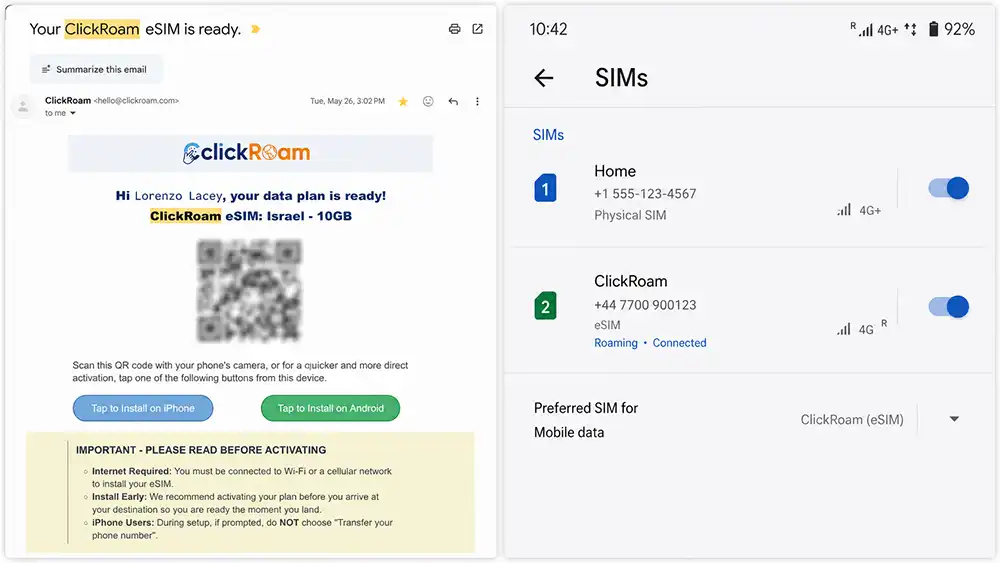
The setup experience was easily the strongest part of my first test.
With many eSIM services, activation can feel a bit clunky. You often have to download a dedicated app or display a QR code on a laptop or a second device screen so your own phone can scan it. If you are sitting on a plane or waiting in an airport terminal with just your phone, that can be incredibly frustrating.
ClickRoam handles this well by eliminating the friction of physical SIM cards right from the start:
- Open the confirmation email from ClickRoam on your smartphone.
- Tap the direct installation link provided.
- Follow your phone’s automatic prompt to add and label the line.
For me, the installation process took less than 2 minutes from opening the email to having the eSIM ready. It is a straightforward setup process that feels like it was designed for normal travelers, not just tech-savvy users.
Real-World Performance: My ClickRoam eSIM Review Baseline
I first tested ClickRoam here in Israel, using it across dense urban environments in Tel Aviv and Jerusalem, as well as more remote areas like the Dead Sea region.
Real-World Usability
While I cannot independently verify every technical backend network-routing claim the vendor makes, I can say that the connection worked great in my first test. The eSIM successfully connected to local networks, and I used it extensively for everyday travel and communication needs:
- Navigation: Maps loaded seamlessly and tracked my location accurately without lag or drops.
- Communication: Standard apps like WhatsApp, email syncing, and social media apps worked smoothly.
- Tethering: I frequently used my phone as a hotspot to power my laptop. Because ClickRoam includes tethering at no extra cost, I didn’t have to jump through extra technical hoops or pay hidden fees to stay productive.
Looking Ahead to Europe (August 2026)
A single-country test is a great baseline, but the ultimate test for an international travel eSIM is its ability to deliver instant connectivity across borders. I will be taking ClickRoam with me to Europe this August to see how seamlessly it handles multi-country hopping. I will update this review with those cross-border results as soon as I return. Until then, this review should be read as a first hands-on test, not a full multi-country performance review.
Europe Trip Update: Switzerland, Austria, Germany, and Liechtenstein
When I first published this ClickRoam eSIM review, I wrote that I planned to update it after testing the service during a multi-country Europe trip. I have now completed that trip, so this section is the promised follow-up.
I used ClickRoam across Switzerland, Austria, Germany, and Liechtenstein, and in practical day-to-day travel use, it worked perfectly for my needs.
This was a more meaningful test than my original baseline. A travel eSIM can work well in one country, but Europe adds a different kind of challenge: crossing borders, moving between cities and smaller areas, checking routes while on the road, using messaging throughout the day, and depending on mobile data without wanting to constantly check settings.
During the trip, I used ClickRoam for:
- Google Maps and route planning
- WhatsApp and regular communication
- Email and browsing
- Checking hotel and travel details
- Looking up restaurants, attractions, and opening hours
- Video and social media
- Work
- General mobile data while moving between countries
The strongest thing I can say is that I did not have to think about it. The eSIM stayed in the background and simply worked, which is exactly what I want from a travel connectivity tool. It automatically coneccted to the best provider, and I had service even in the most remote mountains and small towns.
I did not run formal speed tests in every country, so I will not pretend this was a lab-style technical review. I also still cannot independently verify every backend network-routing claim ClickRoam makes. But from a real traveler’s perspective, this Europe test made me much more confident in the product.
After using ClickRoam successfully in Israel and then across Switzerland, Austria, Germany, and Liechtenstein, I now see it as more than a promising first impression. It is a travel eSIM I have tested in real conditions across multiple countries, and it performed exactly the way I hoped it would.
⚽ The World Cup 2026 Angle: “Stadium-Priority” Plans

If you are planning to travel for the 2026 World Cup in North America, ClickRoam has introduced something unique. They are promoting specific USA and regional plans equipped with what they call “Stadium-Priority 5G” and “Tier-1 Congestion Bypass.”
The brand says these plans are technically optimized to help reduce connectivity problems in crowded stadium environments, where tens of thousands of fans hitting a network at once typically cause data dropouts. While I haven’t personally tested these stadium plans yet, they are a very interesting feature to watch for sports fans heading to the matches who want to ensure their phones stay connected in the crowd.